














PC builders often worry that an electric air duster will damage a GPU, motherboard, or RAM. The concern is understandable, but the practical answer is more specific than "air is safe" or "air is dangerous": distance, fan control, and short bursts matter most.
The concern is not unfounded. High-pressure air directed incorrectly at a GPU can overspin fan bearings. Spinning fans can generate a charge. Surface-mount components can be stressed by sustained pressure at close range. None of these risks are imaginary — but each has a specific mitigation, and the mitigation for all three comes down to technique.
The Three Risks, Assessed Honestly
Fan bearing overspin is the most frequently validated risk in PC cleaning discussions. When an air blast spins a fan beyond its rated RPM, the bearing sustains stress that can shorten lifespan or, in an already-degraded fan, accelerate failure [1][2]. The fix is simple: hold each fan blade stationary before directing air at it. A finger, a piece of cardboard inserted between the blades, or a zip tie threaded through the blade gap all work. This technique applies equally to canned air and electric dusters.
Electrostatic discharge is a real concern in PC work generally. The specific scenario — a spinning fan generating a charge that discharges into the motherboard — is technically possible but rarely the actual mechanism of component failure, based on the breadth of standard PC-cleaning precautions [1][2]. Holding fans stationary eliminates the charge generation path. Working on an unplugged system with a hand resting on the unpainted metal chassis handles the rest.
Pressure damage to surface-mount components — capacitors, resistors, coils — is associated with industrial air compressors delivering sustained high-PSI output at very close range [3]. Consumer electric dusters at 6–8 inches of working distance do not deliver the contact pressure levels associated with component damage. The risk scales with proximity and duration, not with the device's headline air speed rating [3][8].
What Working Distance Actually Does
At 6–8 inches (15–20 cm), even a high-output duster's effective PSI at the component surface is a fraction of industrial-compressor nozzle pressure. Work at 6–8 inches, use short 2–3 second bursts, and angle the blast to move dust away from the component surface rather than deeper into it.
Component-specific guidance:
Component |
Recommended Technique |
Primary Risk to Avoid |
GPU heatsink fins |
6–8 inch distance, short bursts, fans held stationary |
Fan overspin; dust compacted deeper into fins |
CPU tower cooler |
Direct air parallel to fins, not perpendicular |
Dust driven further into fin stack |
RAM slots |
Low speed, angled passes; remove DIMMs first for deep clean |
Debris pushed further in with direct blast |
Motherboard VRM area |
Short bursts, 8+ inch distance |
Pressure on surface-mount components |
Case fans |
Hold all blades stationary before any air contact |
Bearing stress; charge generation |
PSU intake filter |
External passes only — never blow into open PSU housing |
Debris redistribution inside PSU |
Why Canned Air Is on the Way Out
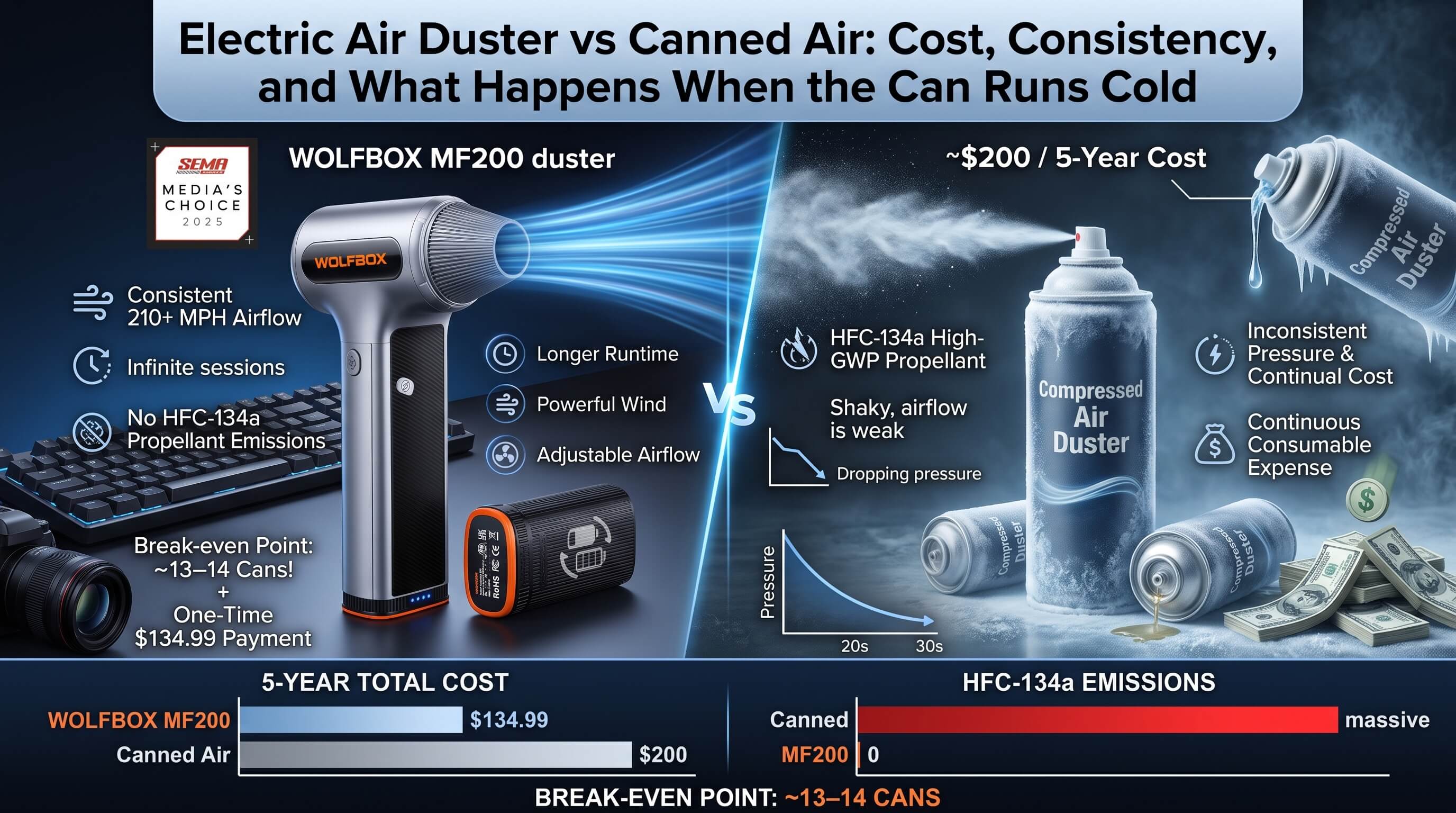
Canned air has three practical problems that accumulate over time. Tilting the can during sustained use causes the propellant (typically difluoroethane) to condense and spit liquid onto components [3][4]. A full mid-tower clean typically consumes 2–3 cans at $8–12 each. Pressure diminishes as the can empties. And each can is single-use waste.
Electric dusters eliminate all three issues: consistent output throughout the session, no propellant, no condensation risk, and rechargeable. The economics favor electric after approximately two cleaning sessions.
MF200 vs. MF100: Which to Choose
The Wolfbox MF200 produces 210 MPH+ airflow with a three-speed brushless motor and a swappable battery design [5][7]. When one battery pack depletes mid-session, you swap in a second rather than waiting for a recharge. For cleaning a full-tower build, multiple systems in sequence, or systems with significant annual dust accumulation, this is the relevant advantage.
The Wolfbox MF100 produces 190 MPH+ and weighs approximately 300g [6] — lighter and better suited to keyboards, desk surfaces, compact ITX builds, and routine monthly dust passes on smaller cases.
Both models have three-speed adjustment. Use the lowest setting for RAM slots, M.2 cards, and the CPU socket area. Use maximum speed for heatsinks, case fans, and intake mesh with heavy dust load.

Full System Cleaning Sequence
Cleaning top-to-bottom with the case vertical lets gravity assist removal.
- Start with the PSU intake filter: external passes only
- CPU cooler: parallel to the fin array, side to side
- GPU: all fans stationary, work inward from fin edges
- RAM and M.2 slots: low speed, angled away from slot interior
- Motherboard surface: short bursts at distance
- Case fans: stationary throughout
- Front intake mesh and filters: remove first, blow outward from the interior face
- Case fans one final pass: dust disturbed from the rest of the system settles back on them during cleaning, so a second pass at the end produces noticeably cleaner results

Frequently Asked Questions
Q: Will an electric air duster damage my GPU's fans or bearings?
Only if you allow the fans to spin freely at high RPM during cleaning. Hold each fan stationary with a finger or cardboard before directing airflow at the heatsink. This eliminates the bearing stress risk entirely.
Q: Is there an ESD risk from using an electric duster on a motherboard?
Low in practice when fans are held stationary and the system is unplugged. Touch the unpainted metal of the PC case before handling any components.
Q: How close should I hold the duster to the motherboard?
6–8 inches (15–20 cm). Closer than 4 inches at high speed delivers more contact pressure than is needed for dust removal.
Q: MF100 or MF200 for PC cleaning?
MF200 for mid-tower and full-tower builds or multi-system sessions where battery life matters. MF100 for compact builds, keyboards, and routine maintenance passes. The swappable battery on the MF200 is the key advantage for extended sessions.
Q: Can I use an electric duster on a laptop?
Yes, with care. Use the lowest speed setting, maintain 6+ inch distance, and direct airflow toward the exhaust vent from the intake side. Never blast directly into the exhaust port at full power.
References
[1] ASUS Support — cleaning notebook and desktop computer ventilation areas: https://www.asus.com/support/faq/1045794/
[2] Apple Support — cleaning device surfaces safely: https://support.apple.com/en-us/103258
[3] Lenovo — How to clean a PC safely: https://www.lenovo.com/us/en/glossary/how-to-clean-pc/
[4] Falcon Safety — Dust-Off product information and safety context: https://www.falconsafety.com/
[5] Wolfbox MF200 official product page — 210 MPH, 3-speed, swappable battery, 4 nozzles: https://wolfbox.com/products/compressed-air-duster-mf200
[6] Wolfbox MF100 official product page — 190 MPH, 70 CFM, approximately 300g: https://wolfbox.com/products/compressed-air-duster-mf100
[7] Wolfbox — Air Duster Review: Battery Life, PSI and HEPA Filter Test: https://wolfbox.com/blogs/air-duster/wolfbox-air-duster-review
[8] Intel — Gaming PC cleaning guidance: https://www.intel.com/content/www/us/en/gaming/resources/how-to-clean-a-gaming-pc.html


Leave a comment
This site is protected by hCaptcha and the hCaptcha Privacy Policy and Terms of Service apply.