













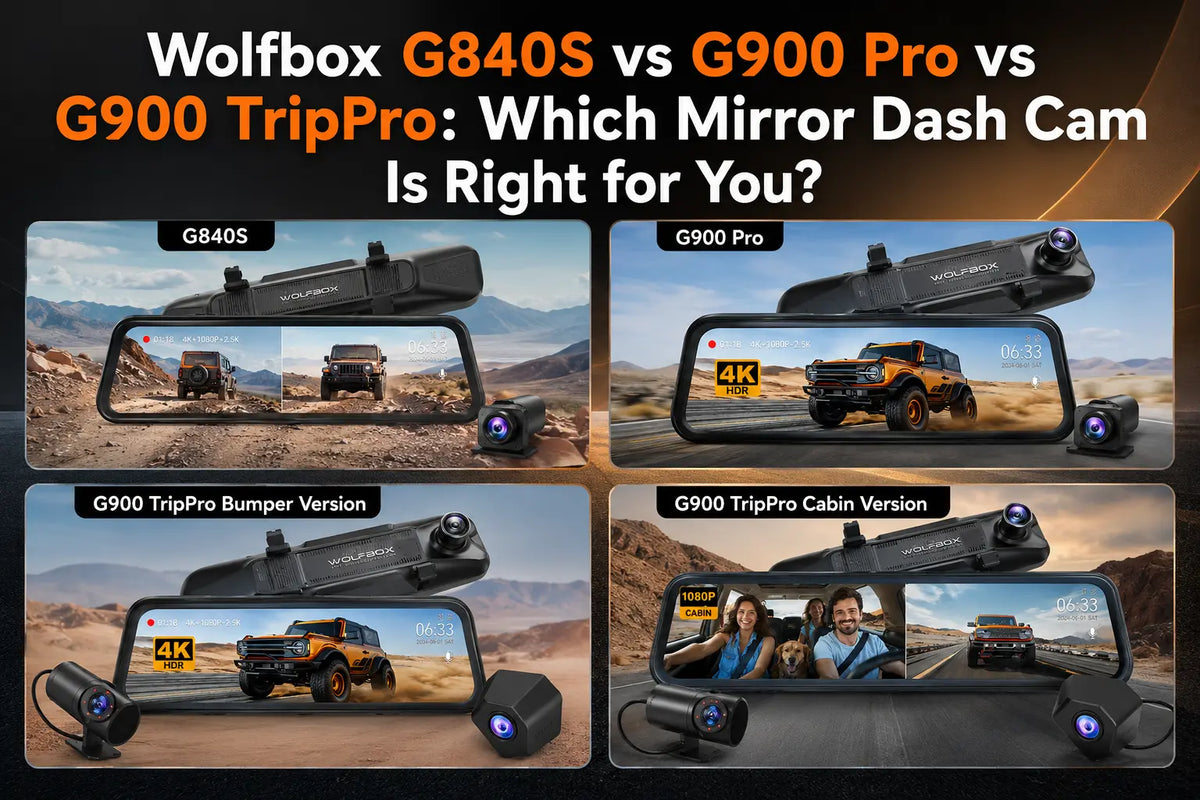
The G840S, G900 Pro, and G900 TriPro are not three price points for the same buyer. They answer different problems. The G840S is the practical two-channel mirror cam, the G900 Pro adds stronger rear recording and easier wireless file transfer, and the G900 TriPro is for drivers who need a third camera for bumper or cabin coverage.[1][2][3]
The fastest way to choose is to ignore the model names for a minute and ask what you need to record: front and rear only, front and rear with easier file transfer, or front and rear plus a third view.
Quick Match
|
If this sounds like you |
Start here |
|
You want a proven mirror dash cam without extra features |
G840S |
|
You want 4K front recording, stronger rear footage, WiFi, voice control, and GPS |
G900 Pro |
|
You drive a truck or SUV and want low-front bumper visibility |
G900 TriPro Bumper |
|
You drive rideshare, manage a fleet, or want cabin recording |
G900 TriPro Cabin |
What G840S Does Well
The G840S covers the core reason most people buy a mirror dash cam: front-and-rear recording with a large mirror display. It is the right starting point if you want a clean rear-camera view, loop recording, GPS support, and a familiar mirror-style interface without paying for WiFi, voice control, or a third channel.[1]
The trade-off is convenience. Without WiFi, file transfer depends more on the microSD card workflow. For drivers who rarely pull footage unless an incident happens, that is acceptable. For rideshare or fleet use, it can feel slow.
Buy the G840S if your priority is replacing the factory mirror view with a larger rear-camera display and keeping the setup simple. Skip it if you expect to pull clips from your phone often or if you want driver-assist warnings.

Why G900 Pro Costs More
The G900 Pro is the better fit when rear footage matters. Wolfbox positions it with 4K front recording, a 2.5K rear camera, 5.8GHz WiFi, voice control, GPS, and parking monitoring support.[2]
Those features are mainly about recording quality and file-management convenience. They do not replace factory driver-assistance or safety systems.
This is the model for drivers who want a daily-use upgrade without moving into a three-camera system. The rear-camera improvement matters at night, in rain, and when a rear plate or lane detail is the evidence you actually need.

When G900 TriPro Is the Right Upgrade
The G900 TriPro adds a third camera. The important question is what that third camera should see.[3]
Choose the bumper version if you drive a truck, SUV, van, or towing setup and want a low-front view for curbs, parking blocks, hitching, or tight driveways. Choose the cabin version if the passenger area matters: rideshare disputes, family monitoring, delivery work, or fleet accountability.
For many daily drivers, TripPro is more camera than they need. For commercial, truck, or rideshare use, the third camera can solve a real blind spot.
The bumper version is not just a gimmick for trucks. It helps in the exact moments a windshield camera is least useful: pulling close to a wall, lining up in a tight driveway, or checking a low obstacle before the hood blocks it. The cabin version is different. It is about documenting people and conversations inside the vehicle, so rideshare and fleet drivers should pair it with clear passenger-notice habits.

Who Should Not Upgrade?
Do not buy G900 TriPro just because it is the bigger system. If your car is a normal commuter sedan and you only care about front and rear collision footage, G900 Pro is likely enough. Do not buy G840S if you know you will hate removing a microSD card.
Parking Mode, Storage, and Setup
Parking mode depends on power. Wolfbox explains that hardwire installation is used when drivers want parking protection after the ignition is off.[4] Without a hardwire setup, most dash cams shut down when vehicle power shuts off.
Storage matters too. For 4K loop recording, use a high-endurance microSD card rather than a basic consumer card. A cheap card may work at first, then fail after repeated heat cycles and constant overwriting.
The practical setup decision is simple: if the car is parked outside overnight or in public lots, budget for the hardwire kit from the start. If the car is garaged and you only need road footage while driving, the standard power setup may be enough.
Setup checks before choosing a model
- Independent G900 Pro testing reinforces that mirror-style dash cams can offer strong coverage but require more careful fit and installation planning than a simple windshield camera.[5]
- For continuous recording, high-endurance cards are built for repeated writing in dash cams and security systems, so storage choice should be part of the model decision.[6]
- The G900 TriPro Cabin product page supports the article’s camera-count distinction because it specifies front, rear, and cabin monitoring features.[3]
Additional source checks
- The G900 TriPro Bumper page adds support for separating bumper/exterior coverage from cabin-focused three-channel setups.[7]
- Wolfbox’s hardwired-vs-plug-in guide reinforces that mirror dash cam selection should include power setup and cable routing expectations, not only camera count.[8]
Frequently Asked Questions
What is the main difference between G840S and G900 Pro?
G900 Pro adds stronger rear recording, WiFi, voice control, GPS, and parking monitoring support compared with the simpler G840S.
Who should buy G900 TriPro?
Choose G900 TriPro Bumper if you need low-front bumper visibility for trucks, SUVs, towing, or tight parking. Choose G900 TriPro Cabin if you need interior recording for rideshare, delivery, fleet, or passenger-area documentation.
Does G840S have WiFi?
The G840S is the simpler model; buyers who want wireless file transfer should look at G900 Pro or G900 TriPro.
Do these mirror dash cams require a subscription?
No. Wolfbox mirror dash cams record locally to a microSD card rather than requiring a monthly subscription.
Does parking mode work without extra wiring?
For reliable parking mode after the car is off, plan on using a compatible hardwire kit.
Which model is better for a pickup truck?
G900 TriPro Bumper is usually the better fit because the third camera can show low-front clearance.
References
[1] Wolfbox G840S product page — https://wolfbox.com/products/wolfbox-g840s-12-4k-mirror-dash-cam-2160p-full-hd-smart-rear-view-camera-mirror-dash-cam
[2] Wolfbox G900 Pro product page — https://wolfbox.com/products/wolfbox-2024-g900-pro-wifi-touch-screen-parking-monitoring-dash-cam-smart-mirror-with-starvis-678-sensor
[3] Wolfbox G900 TriPro Cabin product page — https://wolfbox.com/products/wolfbox-g900tripro-cabin-version-3-channel-dash-camera
[4] Wolfbox dash cam general FAQ — https://community.wolfbox.com/support/post/dash-cam-general-faq-rkvMmGVAyXJjlG3
[5] TechRadar: Wolfbox G900 Pro Review — https://www.techradar.com/vehicle-tech/dash-cams/wolfbox-g900-pro-dash-cam-review
[6] SanDisk High Endurance microSD Card — https://www.sandisk.com/products/memory-cards/microsd-cards/sandisk-high-endurance-uhs-i-microsd
[7] Wolfbox: Hardwired vs Plug-In Dash Cam — https://wolfbox.com/blogs/dash-cams/hardwired-vs-plug-in


Leave a comment
All comments are moderated before being published.
This site is protected by hCaptcha and the hCaptcha Privacy Policy and Terms of Service apply.