













WOLFBOX Brands
WOLFBOX Brands
When you want to install a dash cam in your car, you have two main options: hardwired or plug-in. It is important for you to choose the power method that matches your needs and comfort level. As you read this guide, you will learn the benefits of each type so you can make the best choice for your car and your lifestyle.
Table of contents
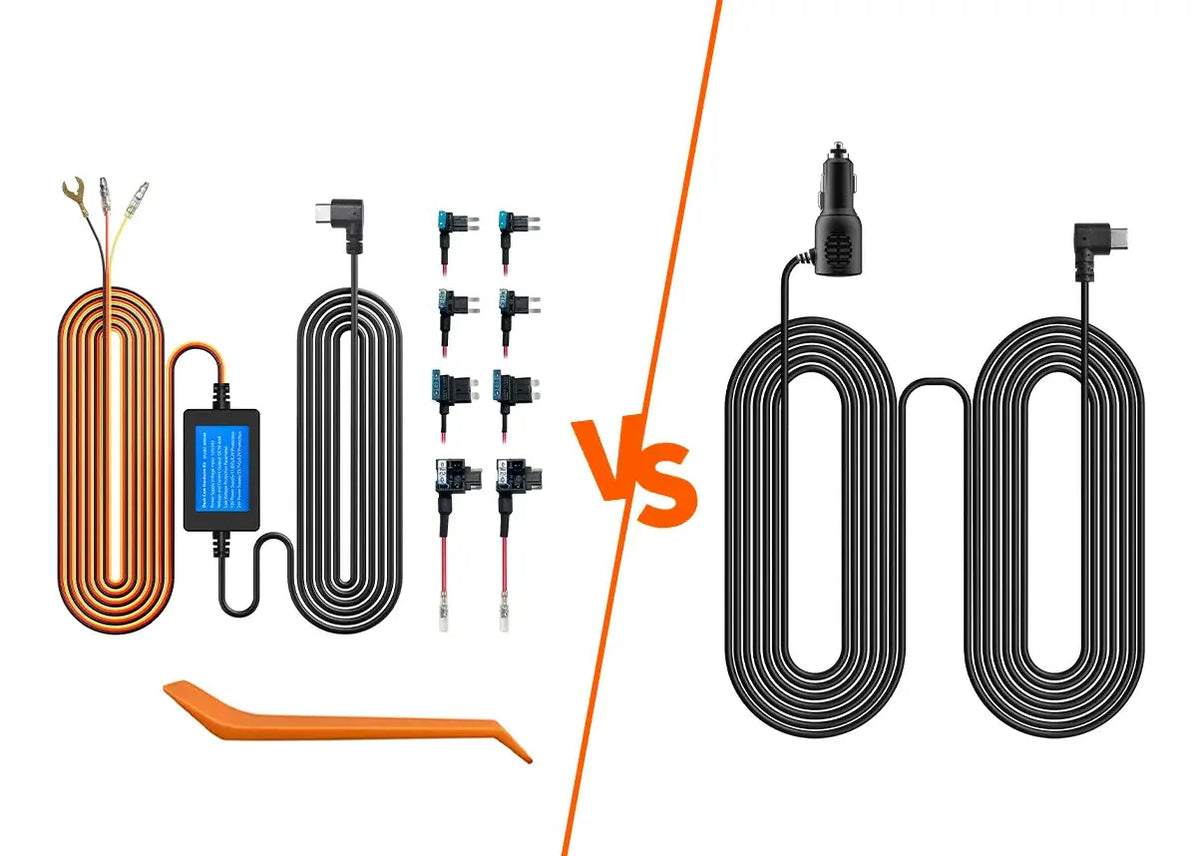
When you choose to hardwire your dash cam, you connect it directly to your car’s electrical system (Fuse Box). This means your dash cam gets power all the time, even if your car is off. You might want this option if you need your dash cam to use features like parking mode which records while your car is parked.
If you hardwire your dash cam, you will connect the camera to your car’s fuse box. The fuse box helps control the power that flows to different parts of your car. By tapping into the fuse box, you make sure your dash cam has steady power which is important if you want it to work when the engine is not running.
A plug-in dash cam gets power from your car’s 12V socket (also called the cigarette lighter). You just plug it in and you’re done—no changes to your car’s wiring. Plug-in setups are faster to install, but you may have visible wires and some features (like parking mode) won’t work unless you add extras.
Compare both types using the table below:
Feature |
Hardwired Dash Cam |
Plug-In Dash Cam |
Power Source |
Connected to your car’s fuse box |
Gets power from 12V socket |
Parking Mode |
Works when car is off |
Needs an extra adapter for parking mode |
Install Difficulty |
Needs more skill; may need a professional |
Simple—just plug it in |
Wire Visibility |
Wires are hidden from view |
Wires will usually be visible |
Compatibility |
Works in most cars (some may need special kits) |
Works in any car with a 12V socket |
Cost |
May cost more for installation and the kit |
Usually cheaper; no installation fees |
Safety |
More secure; less chance of issues |
Be careful not to overload your 12V socket |
Wolfbox Support |
Works with Wolfbox hardwire kits |
Works with Wolfbox plug-in dash cams |
You will need a hardwiring kit to do this. The kit helps connect your dash cam to the car’s fuse box. Parking mode will work and you will have tidy, hidden cables.
Buy a Hardwiring Kit
Choose a hardwiring kit that will work with your dash cam. A Wolfbox hardwiring kit is a good option because it comes with everything you need for a safe and easy install.
Find the Fuse Box
Your car’s fuse box is usually under your dashboard or behind a side panel near your driver’s seat. Open it up and locate a fuse slot you can use for your dash cam’s power.
Connect the Power Wires
Take the red wire from your hardwiring kit and connect it to a fuse that always has power. Connect the black wire to a metal part of your car for grounding. This will keep power flowing even when your car is off.
Hide the Cables
Run the power wire from the fuse box up to your dash cam. Tuck the wire under the trim or along the edges of your car’s interior. This will keep your install neat and out of the way.
Test Everything
Before closing up, turn your car on to check your dash cam. Make sure it powers up and that parking mode activates, if your camera supports it. This proves everything is properly connected.
Put Back the Panels
Once you're sure the dash cam works, reattach any panels or covers. Make sure no wires are showing and check once more that the dash cam turns on as it should. If you need more details, check out Wolfbox’s installation guide and learn about how to install dash cam.
This is the easiest way to power your dash cam. You only need the included charging cable and your car’s 12V socket.
Locate the 12V Socket
Look for your car’s cigarette lighter or 12V accessory socket. This is often on the center console, dashboard or near the gear shifter, within easy reach for plugging in the dash cam.
Route the Cable
Plug the power cable into your dash cam and take the cable to your 12V socket. You can tuck the cable under the dash trim to keep things looking clean and avoid loose wires dangling.
Plug In the Dash Cam
Plug the other end of the power cable into your car’s 12V socket. Make sure the dash cam is facing forward with a clear view. Avoid blocking the lens with rearview mirrors or stickers.
Test the Dash Cam
Start your car. Your dash cam should turn on automatically and start recording. If it doesn’t turn on, check that the cable is firmly plugged in and your car’s socket is working.
Complicated Wires
If you find the wiring tough to manage, don’t force it. You can always ask a car shop or your local electronics expert for help installing your kit safely and properly.
Losing Power
If your dash cam suddenly shuts off or is not powering up, you should check the fuse slot and the wires. Make sure all the wires are connected tightly and the fuse is not broken or loose.
Dangling Wires
If you don’t like loose wires showing, you can use clip holders or hide the cable under the dash or mats. This will keep your car looking tidy and prevent the cord from getting caught.
Overloaded Socket
Don’t plug in too many things at once. If your 12V socket stops working, try unplugging other devices. Dash cams don’t draw much power, but too many gadgets can overload the socket.
Pick hardwired if you want parking mode and a neat, hidden install. Hardwiring is a good pick if you use parking lots often and want your dash cam recording when the car is turned off.
Pick plug-in if you want a quick and easy setup without any extras. If you don’t need parking mode, plug-in dash cams get you running in minutes with no changes to your car. If you want the benefits of both methods, look into OBD-II adapters or external battery packs. These give you continuous power with a simple setup.
Both hardwired and plug-in dash cams have their own benefits and limitations. You can go for hardwiring if you want something tidy and you will get many more features, but it might take more time to install. Plug-in is quick and easy to install, but you might not be able to use features like parking mode.
You should think about what matters most for your car and pick the one that works best for you. Wolfbox has both types of kits, so you can find the perfect fit.
Does hardwired mean plugged in?
No, hardwired doesn’t mean plugged in, but connecting your dash cam directly to your car’s electrical system. Whereas plugged in means to use your car’s 12V socket to power the dash cam.
Is it better to hardwire a dash cam or use the cigarette lighter?
If you want features like parking mode and a cleaner, wire-free setup, hardwiring is better. If you prefer quick and easy setup, plugging into the cigarette lighter works well.
Can I leave my dash cam plugged in?
Yes, you can leave your dash cam plugged in, but you should keep in mind that it might drain your car’s battery if your 12V socket stays active even when your car is turned off.
Will hardwiring hurt my car’s battery?
No, it won’t if you use a hardwire kit with low-voltage protection. This feature keeps your battery safe by turning off the dash cam before the battery gets too low.
Is it worth hardwiring a dash cam?
Yes, it’s worth it if you want parking mode, fewer visible wire,s and a more secure, permanent installation that ensures your dash cam runs even when your car is off.