













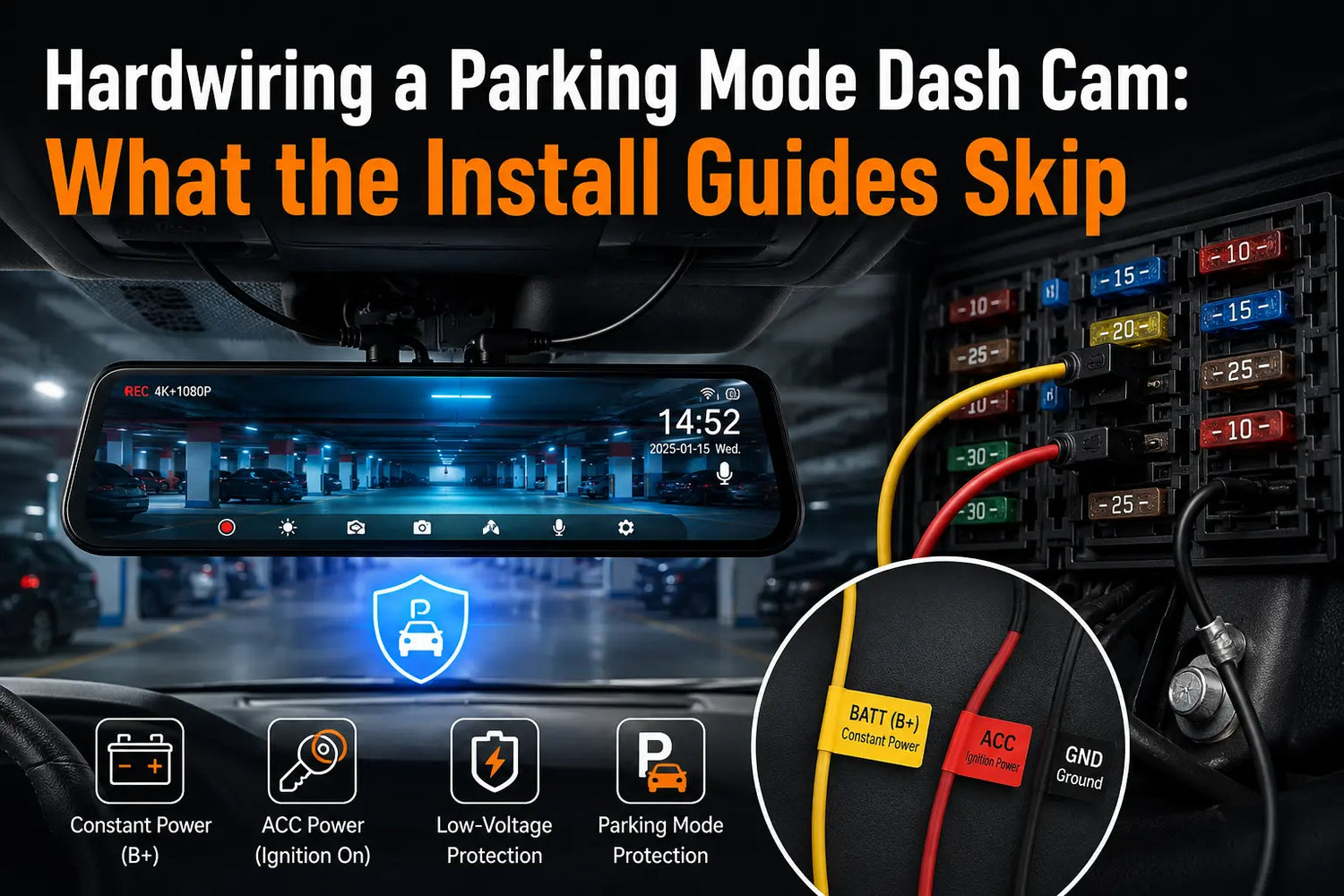
Most hardwire kit problems trace back to two wires and one fuse box. WOLFBOX's Type-C hardwire kit for the G840S, G900 Pro, and related mirror dash cams uses a yellow constant-power wire, a red ACC wire, and a black ground; post-install problems often come down to one of those three being connected to the wrong spot[1][2][4][6][7].
The Wire That Decides Whether Parking Mode Works at All
The yellow wire, labeled BATT or B+, needs to stay powered even with the engine off — that's what keeps the camera running in parking mode. The red wire, labeled ACC, should only carry power when the ignition is on, since that's the signal the camera uses to tell normal driving apart from parked. If yellow ends up on an ACC-only fuse, the camera drops out the instant you shut the engine off and parking mode never triggers. If the two are fully swapped, the camera can end up recording continuously even when the car is parked, because it can no longer read the ignition state correctly[1][2].
Finding the Right Fuse Without Guessing
- Use a fuse tap voltage tester with the engine off first — a fuse slot that reads live power in this state is a constant-power (B+) candidate.
- Turn the ignition to "on" without starting the engine, then retest the same slots — one that was dead before and now reads power is the ACC circuit.
- WOLFBOX's own installation instructions specify an ACC power supply rated 15A to 25A and a constant power supply below 30A — don't tap a fuse outside that range[2].
- Connect the black ground wire to a bare metal bolt or screw that's part of the car's body, not a plastic panel — grounding to plastic won't complete the circuit and the camera simply won't turn on[1][2].
|
Symptom After Install |
Likely Cause |
Fix |
|---|---|---|
|
Camera won't power on at all |
Ground wire attached to plastic instead of bare metal, or yellow wire on a dead fuse slot |
Reattach ground to exposed metal; retest the yellow wire's fuse with a voltage tester[1][2] |
|
Camera loses power the moment the engine turns off |
Yellow (B+) wire connected to an ACC-only fuse |
Move the yellow wire to a fuse that stays powered with the engine off[1] |
|
Camera keeps recording after the car is off and parked |
Red (ACC) wire connected to a constant-power fuse |
Move the red wire to a fuse that only has power when the ignition is on[1] |
|
Parking mode drains the car battery |
Low-voltage cutoff set too low for a standard vehicle |
Raise the cutoff to around 12.0V rather than the lowest available setting[3] |
The Low-Voltage Cutoff Setting People Leave on the Wrong Default
WOLFBOX hardwire kits include low-voltage protection that shuts off power to the dash cam at the selected threshold, helping prevent parking mode from drawing the vehicle battery down too far. Use the kit’s documented 11.8V protection threshold as the lower boundary; a 12.0V setting is the more conservative everyday choice when the kit offers it[3][5].
What Written Manuals Usually Skip
Manuals explain which wire is which color, but they can't tell you which specific fuse slot in your specific car's fuse box carries constant power versus ACC power, because that layout varies by make, model, and even trim level. That's the actual work of a hardwire install — probing fuse slots with a tester, not just matching wire colors to a diagram. Anyone installing one of these kits for the first time should plan for that trial-and-error step to take longer than connecting the wires themselves[1][2].
Frequently Asked Questions
Why does my dash cam turn off as soon as I turn off my car?
The constant-power (yellow) wire is likely connected to an ACC-only fuse instead of one that stays powered with the engine off[1].
Why does my dash cam keep recording after I've parked and turned off the car?
The ACC (red) wire is likely connected to a constant-power fuse, so the camera can't detect that the ignition is off[1].
What low-voltage cutoff setting should I use for a normal car?
Around 12.0V is a conservative everyday setting for many passenger vehicles; do not set a WOLFBOX hardwire kit below its 11.8V protection threshold[3][5].
Do I need a hardwire kit to use parking mode?
Yes. Parking mode requires constant power routed from the vehicle's fuse box, which the standard cigarette-lighter power cable can't provide[1][2].
References
[1] Amazon: WOLFBOX USB-C Hardwire Kit for G850PRO/G840S/G930 — installation instructions and wiring detail — https://www.amazon.com/WOLFBOX-Hardwire-Parking-Multiple-connectors/dp/B09X9F8GMT
[2] EZ Dash Cam: WOLFBOX USB-C Hardwire Kit for G840S, G930, G910, G850, G900 product page — https://ezdashcam.com/wolfbox-usb-c-hardwire-kit-for-g840s-g930-g910-g850-g900-g840h-g900-pro-v1/
[3] Reddit r/Dashcam: Hardwire kits with actual low voltage protection — cutoff voltage reference — https://www.reddit.com/r/Dashcam/comments/dvtqhq/hardwire_kits_with_actual_low_voltage_protection/
[4] WOLFBOX: Dash Cam Installation Guide — In-Depth Instructions for a Seamless Setup — https://wolfbox.com/blogs/news/dash-cam-installation-guide-in-depth-instructions-for-a-seamless-setup
[5] Walmart: WOLFBOX USB-C 4A ACC Hardwire Kit — battery discharge protection specifications — https://www.walmart.com/ip/WOLFBOX-Acc-Hardwire-Kit-G840S-G930-G850-G900-G840H-I05-I07-Suitable-D07-Type-C-Hardwire-Car-Charger-Cable-Kit-for-Dash-Cameras-with-Battery-Discharge-Protection/5044887962
[6] WOLFBOX G840S product page — https://wolfbox.com/products/wolfbox-g840s-12-4k-mirror-dash-cam-2160p-full-hd-smart-rear-view-camera-mirror-dash-cam
[7] WOLFBOX G900Pro product page — https://wolfbox.com/products/wolfbox-2024-g900-pro-wifi-touch-screen-parking-monitoring-dash-cam-smart-mirror-with-starvis-678-sensor


Leave a comment
All comments are moderated before being published.
This site is protected by hCaptcha and the hCaptcha Privacy Policy and Terms of Service apply.