













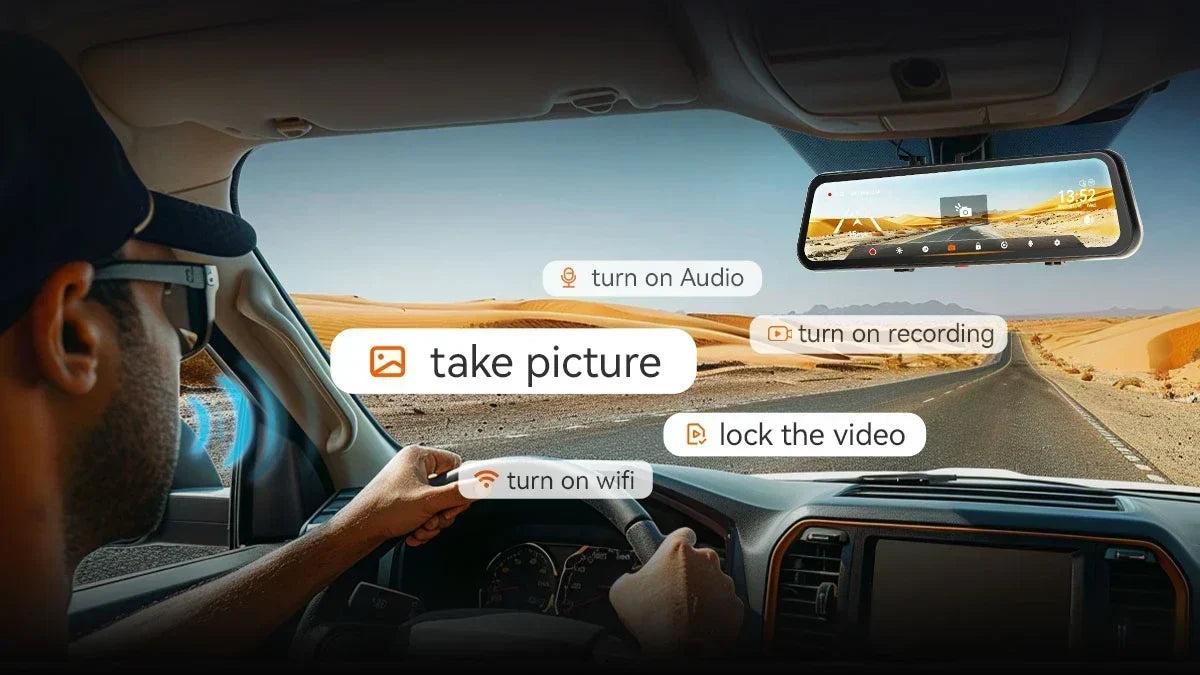
You're merging onto the highway and decide to snap a photo of the sunset ahead. That means taking a hand off the wheel to hunt for a tiny button. And there is a serious risk of accidents involving crashes and collisions. A dash cam with voice control eliminates the entire problem.
No more fumbling with buttons while you're supposed to be watching the road. Just say what you want, like "take a picture" or "lock video," and the camera handles the rest. This guide walks through why voice control matters and how WOLFBOX models stack up, so you can pick the best one.
What Is a Dash Cam with Voice Control and Why Is It a Game-Changer?
A dash cam with voice control is a smart camera system that lets drivers operate key functions using spoken commands instead of pressing buttons. It merges traditional dash-cam recording with hands-free technology to make your driving safer, more convenient, and less distracting.
What Is Voice Control in a Dash Cam?
A voice-controlled dash cam responds to specific spoken instructions. Drivers can manage recording, capture photos, or switch views without touching the device. Unlike voice assistants (Siri or Google Assistant), dash cam voice control is limited to driving-related functions.
How Does Voice Recognition Work?
A voice-controlled dash cam is built around a microphone and a command detection system.
- Built-in Microphone: Continuously listens for trigger words or commands.
- Voice-Command Detection: Filters out background noise (like engine sounds or traffic).
- Command Recognition: Matches spoken words to a pre-programmed list of supported actions.
- Camera Response: Executes the command instantly (saving a video or switching views).
- Microphone Quality: A high-quality mic ensures commands are understood even in noisy environments.
Hands-free operation aligns with global road safety initiatives by organizations like AAA and IIHS. [1] [2] Also, multi-language support ensures accessibility worldwide.
Top Benefits of a Voice-Controlled Dash Cam
The biggest benefit of a voice-controlled dash cam is rather simple. It lets you keep your hands on the wheel and your eyes on the road while still giving you full control over your camera.
Safe Driving
The most obvious benefit of a voice-controlled dash cam is hands-free safety. Drivers can keep both hands firmly on the steering wheel. No need to lean forward or reach toward the camera while driving.
It reduces unnecessary interactions with buttons or touchscreens. It seems quite useful in active driving situations such as highway merging or city traffic. Even a two-second distraction doubles the risk of a crash.
Captured Moments
Voice commands allow drivers to record or photograph events instantly without breaking focus. Passing a scenic location? Say “Take Picture” to capture the view.
Spotting unusual road behavior? Secure visual evidence immediately. Need proof of a traffic violation? A quick command saves the moment.
Protected Footage
One of the most valuable commands is “Lock Video.” It prevents crucial footage from being overwritten by loop recording. You can ensure the safe storage of accident or incident clips.
Thus, it provides reliable evidence for insurance claims or legal disputes. Video evidence can significantly strengthen claims after collisions, making this feature a practical safeguard. [3]
Reduced Distraction
Traditional dash cams require pressing small buttons or navigating menus. Voice control eliminates such issues entirely. No need to search for tiny physical buttons.
No need to glance at the camera, touchscreen, or manual menu navigation. It reduces visual and physical distraction, aligning with global road safety recommendations. [1] [2]
Convenient Display Control
Another underrated benefit is display management. Saying “Turn Off Screen” reduces glare during nighttime driving.
It minimizes dashboard clutter and visual distraction. You can keep the driving environment calmer and less visually active.
Nighttime glare contributes to driver fatigue. A simple voice command to dim or switch off the screen can make long night drives safer.
Key Voice Control Features to Look For
Not all voice control systems perform the same on the road. The best dash cam with voice control recognizes your commands accurately over road noise and responds instantly. And it also covers the commands you'll actually use, not just a flashy list on a spec sheet.
Voice Command Recognition Accuracy
A dash cam’s voice control is only as good as its ability to understand commands in real-world driving conditions. So, it must recognize speech clearly despite road noise, engine vibration, or air conditioning.
The system should work even when music is playing or windows are open. And it needs to handle different speaking volumes. Reliable recognition matters: a short, accurate list is more valuable than a long list that fails under noisy conditions.
Response Speed
Voice control should feel instantaneous. Critical commands like “Lock Video” must execute immediately. Delayed responses reduce the practical value of voice control.
Test or review how quickly the cam responds to commands. A dash cam that takes several seconds to react may fail to capture crucial evidence in fast-moving incidents.
Useful Voice Command Vocabulary
Quantity isn’t everything; usefulness matters the most. Essential hands-free commands include –
- “Lock Video” – saves critical footage.
- “Take Picture” – captures still images.
- “Show Rear Camera” – toggles views.
- “Turn Off Screen” – reduces glare.
A dash cam with 10 practical voice commands is more valuable than one boasting 50 rarely used ones.
Video Resolution
High-quality recording is essential for evidence. The front-camera resolution should ideally be 2K or 4K for plate visibility. [4]
Rear-camera resolution is crucial for tailgating or rear-end incidents. Evaluate both daytime clarity and night recording.
Camera Channels
Dash cams differ in coverage. A front-only cam only provides basic protection. Whereas a front + rear cam covers both directions.
A three-channel system adds cabin view for rideshare or family safety. And interior/cabin coverage works well for taxis, rideshare, or monitoring passengers.
You should match channel configuration to use cases. Commuters may prefer front+rear, while rideshare drivers benefit from cabin coverage. [5]
Night Vision and Image Sensor
Low-light performance is essential for reading license plates. Nighttime driving requires clear visibility of plates and surroundings.
Sensors like Sony STARVIS are known for strong low-light performance. Always review the sample footage to judge real-world quality.
Wi-Fi and Smartphone/App Connectivity
Uninterrupted connectivity makes dash cams more versatile. Wireless footage transfer avoids the need to remove memory cards.
Smartphone apps allow easy video viewing and sharing. Useful for quickly sending evidence to insurance companies or law enforcement.
Parking Monitoring
Parking mode protects your vehicle and records incidents like hit-and-runs or vandalism. It requires proper installation and power configuration (hardwiring or battery packs).
Different models vary in sensitivity and recording triggers. In urban areas with high parking density, this feature can be a major safeguard. [6]
Multi-Language Support
Voice control should be accessible to diverse users worldwide. Multi-language support benefits multilingual households and international drivers.
Check supported languages, as many models only support English. Avoid assuming every dash cam supports all languages; compatibility varies widely.
Display and Physical Controls
Voice control should complement, not replace, other controls. Touchscreens allow intuitive navigation. [7] Mirror-style displays integrate seamlessly with the car’s interior.
Physical buttons remain useful as backups. Screen-off functionality reduces glare and distraction. A balanced design ensures drivers can rely on both voice and manual controls depending on the situation.
Top Dash Cams with Voice Control: WOLFBOX Series
WOLFBOX offers four voice-controlled models for different priorities. You can get a budget-friendly two-camera setup, or a full three-channel system with cabin or bumper monitoring.
WOLFBOX G850 Pro
The G850 Pro combines a high-resolution front camera with a rear camera and 12 built-in voice commands. Thus, it covers everything from “turn on WiFi” to “lock the video.” [8] [9]
It also adds ADAS and blind spot detection alerts. So, the G850 Pro remains a strong pick for drivers who want driver-assist features along with hands-free control at a lower price point.

WOLFBOX G900 Pro
The G900 Pro steps up to a 4K front camera with a Sony STARVIS 2 IMX678 sensor and a 2.5K rear camera with an OmniVision PureCel® Plus OS04J10 sensor. Together, they deliver clear, detailed footage with strong low-light performance. Its voice control also works without requiring a wake word.
So, commands like “show rear camera” work the moment you say them. And it makes the G900 Pro a smooth upgrade for drivers who want sharper footage without any extra setup friction. [10] [11]

WOLFBOX G900 TriPro – Bumper Version
The Bumper Version adds a third, waterproof 1080P camera mounted low on the front bumper. And it gives you a ground-level view that's ideal for off-roading, tight parking, and spotting curbs/obstacles.
Voice control here uses an exclusive “hey wolf” wake word/phrase. Thus, it keeps all three channels, front, rear, and bumper, under hands-free control. [12] [13]

WOLFBOX G900 TriPro – Cabin Version
The Cabin Version swaps the bumper camera for an infrared interior-facing lens. Thus, it becomes the strongest pick for rideshare drivers and families monitoring a rear-facing car seat. [14] [15]
The same goes for anyone who wants a documented record of what happens inside the vehicle. It shares the same 4K front and 2.5K rear coverage, plus the same wake-word voice control as the Bumper Version.

Summary Comparison: G850 Pro vs G900 Pro vs G900 TP Bumper vs G900 TP Cabin
|
Model |
Voice Commands |
Channels |
Video Res. (Front/Rear) |
Night Vision Sensor |
WiFi/App |
Parking Mode |
|---|---|---|---|---|---|---|
|
G850 Pro |
Yes, 12 commands |
2-channel |
Upscaled 8MP+4MP |
Last gen custom cmos |
5.8GHz + App |
With hardwire kit |
|
G900 Pro |
Yes, 12 commands |
2-channel |
4K / 2.5K
|
STARVIS 2 IMX678 (front), Omnivision Purecel® Plus OS04J10 (rear) |
5.8GHz + App
|
With hardwire kit |
|
G900 TriPro Bumper |
Yes, "hey wolf" wake word |
3-channel
|
4K / 2.5K + 1080P bumper
|
STARVIS 2 IMX678 + OmniVision OS04J10 |
5.8GHz + App |
With hardwire kit |
|
G900 TriPro Cabin |
Yes, “hey wolf” wake word
|
3-channel
|
4K / 2.5K + 1080P cabin (IR) |
STARVIS 2 IMX678 + OmniVision OS04J10 |
5.8GHz + App |
With hardwire kit |
Real-World Scenarios: Voice Commands in Action
The real value of a dash cam with voice control shows up in everyday driving moments, not spec sheets.
- Highway Driving: Say “Show Rear Camera” to check traffic behind you before changing lanes, without glancing down at a screen.
- Road Trips: Say “Take Picture” to capture a scenic overlook or a memorable moment on the drive, without pulling over.
- Parking Incidents: Say “Lock the Video” the moment something happens in a parking lot, protecting that clip before loop recording can overwrite it.
- Night Driving: Say “Turn Off Screen” to cut display glare on a dark road, keeping your night vision sharp without hunting for a settings menu.
- Rideshare Driving: Record passenger interactions hands-free, keeping both hands on the wheel while the cabin camera documents the ride.
Comparison: Voice Control vs Traditional Dash Cams
The core difference between a voice control dash cam and a traditional button-operated one comes down to where your attention goes. Voice control keeps it on the road; buttons and touchscreens pull it off the road.
|
Factor |
Voice-Controlled Dash Cam |
Traditional Button/Touch Dash Cam |
|---|---|---|
|
Operation |
Spoken commands, no need to look away |
Small buttons or touchscreen taps |
|
Safety |
Eyes stay on the road while driving |
Requires glancing at and reaching for controls |
|
Convenience |
Instant capture of moments as they happen |
Often missed if you fumble for the right button |
|
Distraction |
Minimal, hands stay on the wheel |
Higher, especially at speed or in traffic |
How to Install and Set Up Voice Control on Your Wolfbox Dash Cam
Getting voice control working on a WOLFBOX dash cam takes only a few minutes beyond the standard mount-and-plug-in setup. It is usually enabled by default right out of the box. [8] [10] [12] [14]
- Secure the unit to your existing rearview mirror, or remove the original rearview mirror and install the unit in its place, following the instructions for the included bracket.
- Connect power via the 12V outlet for basic use, or install a hardwire kit for 24/7 parking mode.
- Route the power cable along the headliner and A-pillar trim so nothing dangles near your line of sight.
- Power on the unit; voice control is typically enabled by default. So, you can start testing commands immediately.
- Test a few core commands, like “take picture” or “lock the video,” in a quiet moment. It’ll confirm the microphone is picking up your voice clearly before you rely on it in traffic.
- On TriPro models, try the “hey wolf” wake word first. Then, follow with your command once the unit acknowledges it.
Conclusion
A dash cam with voice control sounds like a convenience feature. However, it marks a small change that keeps your hands on the wheel and your eyes on the road. You may settle for the budget-friendly G850 Pro, the sharper G900 Pro, or the three-channel coverage of either TriPro version.
WOLFBOX's lineup offers a hands-free way to capture footage, lock in evidence, and check your surroundings. Everything takes place without ever reaching for a button. Pick the model that matches how you actually drive, and let your voice do the work your hands used to.
Frequently Asked Questions (FAQs)
What is a voice-activated dash cam?
A voice-activated dash cam is a camera system you control by speaking commands. There’s no pressing buttons or tapping a screen. You can take pictures, lock footage, or switch camera views without taking your hands off the wheel.
Will voice control work with background noise?
Yes, on well-designed systems. WOLFBOX places its microphones close to the driver and tunes them to recognize commands over normal road noise, wind, and low-volume music. Still, very loud environments can occasionally require repeating a command.
Do I need internet for voice control?
No. Voice control on WOLFBOX dash cams processes commands locally on the device. Therefore, core functions like “take picture” or “lock video” work whether or not you have an internet or WiFi connection at the moment.
Can I use voice commands while driving at high speed?
Yes. That's exactly the scenario voice control is built for. You’ll no longer need to look at or touch the device. Voice commands work the same way at highway speed as they do parked in your driveway, which is the whole point of going hands-free.
References
[1] AAA Foundation for Traffic Safety: “Traffic Safety Culture Index” - https://aaafoundation.org/wp-content/uploads/2026/06/202606-AAAFTS-2025-TSCI-Report-Summary.pdf
[2] IIHS/HLDI Bulletin: “Compendium of Collision Avoidance Research” – https://www.iihs.org/topics/bulletins/compendium-of-hldi-collision-avoidance-research
[3] Incident Clips: “Packaging Video Evidence for Insurance Claims” – https://incidentclips.com/blog/how-to-package-video-evidence-for-an-insurance-claim
[4] Transport Canada: “Blinded by the Light: Effects of Vehicle Headlight Glare on Nighttime Driving” – https://tc.canada.ca/en/blinded-by-the-light-vehicle-headlight-glare-nighttime-driving
[5] HaulCover: Dash Cam Footage and Commercial Truck Insurance Claims” – https://haulcover.com/guides/dash-cam-footage-and-commercial-truck-insurance-claims
[6] AAA Foundation for Traffic Safety: “Smartphone-Limiting Technology Report”- https://aaafoundation.org/wp-content/uploads/2026/01/202504-AAAFTS-Smartphone-Blocking-Countermeasures.pdf
[7] National Highway Traffic Safety Administration (NHTSA): “Distracted Driving Dangers and Statistics” – https://nhtsa.gov/risky-driving/distracted-driving
[8] Wolfbox: “Wolfbox G850Pro Dash Cam” – https://wolfbox.com/products/wolfbox-g850pro-dash-cam-4k-wifi-car-dash-camera-front-and-rear-mirror-dashcam
[9] Safe and Sound Mobile: “Wolfbox G850 PRO Review” – https://www.safeandsoundmobile.co.uk/wolfbox-g850-pro-ultimate-4k-dash-cam/
[10] Wolfbox: “Wolfbox G900 Pro Dash Cam” – https://wolfbox.com/products/wolfbox-2024-g900-pro-wifi-touch-screen-parking-monitoring-dash-cam-smart-mirror-with-starvis-678-sensor
[11] TechRadar: “Wolfbox’s G900 Pro is a high-quality mirror dash cam” – https://www.techradar.com/vehicle-tech/dash-cams/wolfbox-g900-pro-dash-cam-review
[12] Wolfbox: “Wolfbox G900TriPro Bumper Version” – https://wolfbox.com/products/wolfbox-g900tripro-bumper-version-3-channel-rearview-mirror
[13] Dash Cam Talk: “Wolfbox G900 TriPRo Bumper Version Review” – https://dashcamtalk.com/forum/threads/wolfbox-g900-tripro-bumper-version-3-channel-rearview-mirror-dashcam-review-more-cameras-for-better-visibility.53328/
[14] Wolfbox: “Wolfbox G900TriPro Cabin Version” – https://wolfbox.com/products/wolfbox-g900tripro-cabin-version-3-channel-dash-camera
[15] Bronco6G: “Wolfbox G900 TriPro with Cabin Camera” – https://www.bronco6g.com/wolfbox-g900-tripro-w-cabin-camera-installation-review/


Leave a comment
All comments are moderated before being published.
This site is protected by hCaptcha and the hCaptcha Privacy Policy and Terms of Service apply.