







Driving a Honda CR-V in late fall often means dealing with wet roads, shorter days and the first signs of winter weather. As November 1, 2026, approaches and daylight saving time comes to an end, many drivers will also find themselves commuting or picking up the kids after dark. Having a dash cam that records what happens around the vehicle can be especially useful during these months.
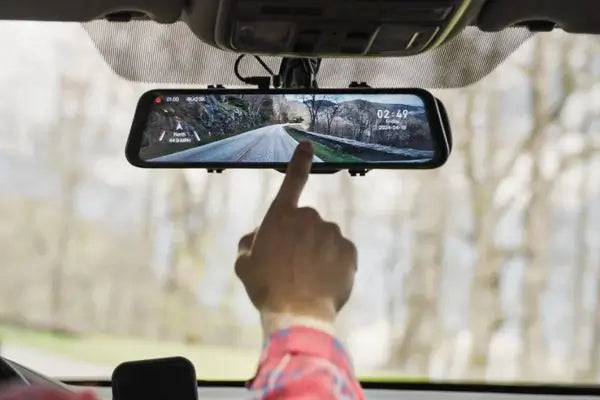
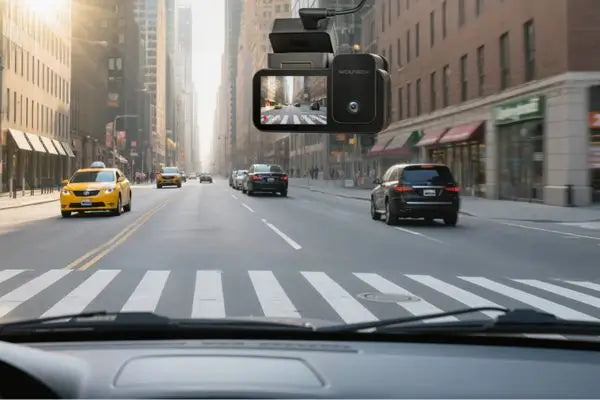
With the WOLFBOX G900 Pro, you can review the road ahead in 4K and what happened behind your CR-V in 2.5K. Both views are available on a 12-inch mirror display ([1]). The G900TriPro Cabin keeps those two cameras and adds a 1080P view of the passengers, with infrared recording for trips after dark ([3]).
What a Rear Camera Adds on Rainy Days
Imagine waiting at a traffic light on a rainy evening. You can see the cars in front of you, but what about the driver approaching from behind? If there's a collision, a rear recording could help show exactly what happened.
Rain is involved in a large share of weather-related crashes in the U.S. Federal Highway Administration figures show an annual average of 744,911 such crashes between 2019 and 2023. Around 77% occurred in rain or mist, while snow, sleet and freezing rain accounted for another 18% ([4]). Having a dash cam that records both directions can help you understand what happened in an accident, especially if another driver disputes who's responsible.
Every 2026 Honda CR-V comes with a factory backup camera and dynamic guidelines, but that camera is mainly there to help you park ([5]). The WOLFBOX G900 Pro goes a step further by recording traffic behind your vehicle while you drive.
If someone hits your CR-V while you're stopped at a wet intersection, you'll have footage to review. The rear camera also works when reversing, with three adjustable parking guidelines to help you judge distances ([1]).
WOLFBOX G900 Pro: Front and Rear Recording for Daily Drives
If you mostly use your Honda CR-V for commuting or everyday trips, the WOLFBOX G900 Pro gives you front and rear coverage without the need for a third camera. It records the road ahead in 4K at 30 fps, capturing details that can be useful when reviewing an incident ([6]).
Nighttime recording is one of its strengths. In its review, IBTimes found that the camera handled bright headlights well, while road markings, cyclists and animals remained visible on unlit roads ([6]). The front sensor also uses noise reduction technology to help keep footage clearer in low light ([1]).
The 2.5K rear camera has a wide 150° field of view, allowing it to capture traffic across multiple lanes behind your CR-V ([1]).
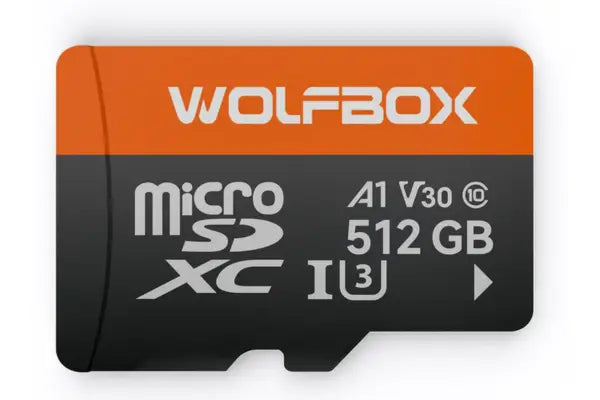
You won't need to clear the memory card after every trip, either. The G900 Pro supports microSD cards up to 512GB and automatically overwrites older, unprotected recordings when the card is full ([1]).
The GPS module plugs into the 3.5mm port on the mirror and saves your speed and location alongside the footage, while 5.8GHz Wi-Fi lets you connect to the WOLFBOX app to view or download videos directly to your phone ([1])([10]).
WOLFBOX G900TriPro Cabin: Back-Seat Recording for Families
On the drive home after sunset, the back seat of your Honda CR-V can be almost completely dark. That's where the WOLFBOX G900TriPro Cabin comes in. Its interior camera has four infrared LEDs and switches to night mode automatically when the light fades ([8]). The Gadgeteer tested it in a dark vehicle and found the recordings sharp and usable ([7]).
The extra camera faces the passengers, recording in 1080P at 25 fps. With a 125° viewing angle, it can include both rear seats and part of the front passenger area ([3])([7])([8]). That gives parents a way to record what happens inside the car during trips with children or pets.
There are a couple of practical details to know before installing it. The microphone can be switched off if you don't want conversations recorded and The Gadgeteer pointed out that the interior camera cable is rather short, leaving less flexibility for mounting ([7]). For a CR-V that rarely carries passengers, the two-camera G900 Pro is probably all you need ([2]).
Installing a WOLFBOX Mirror Dash Cam in Your Honda CR-V
Both the G900 Pro and G900TriPro Cabin attach to your CR-V's existing rearview mirror using rubber straps, so there's no drilling involved ([2]). Before tightening them, check that the front camera has an unobstructed view of the road. The Gadgeteer reviewer had to move the G900TriPro slightly to the left to get the lens into the right position ([7]).
The mirror takes around 20 minutes to mount, according to WOLFBOX. Running the cables is a longer job, with an estimated 30 to 45 minutes for the rear camera and another 20 to 30 minutes if you're installing the Cabin version ([2]). Once everything is connected, make a short test recording before putting the trim panels back.
On CR-V trims such as the EX-L, Sport-L Hybrid and Sport Touring Hybrid, the WOLFBOX display covers the factory automatic-dimming mirror ([5]). You can then use the screen to view footage from the rear camera. In its review, The Gadgeteer found this view wider and clearer than a conventional mirror, particularly useful when passengers or luggage obstruct the rear window ([7]).
Connecting Reverse View and Parking Mode
There are two additional connections to consider, depending on which functions you want to use.
For automatic reverse view, the G900TriPro rear camera needs to be connected to the vehicle's reverse light signal. Once connected, the display switches to the rear camera when you shift into reverse ([7]).
Parking mode requires a separate WOLFBOX hardwire kit for either model. The kit helps limit battery drain by cutting power when the voltage drops below the set cutoff level of 11.8V [1][2].
The G900TriPro Cabin also has a built-in G-sensor. When it detects a sudden impact during recording, it can lock the video file to prevent loop recording from overwriting it ([3]).
Keeping Your WOLFBOX Dash Cam Working in Cold Weather
Freezing temperatures can affect how a dash cam works, especially if your Honda CR-V spends the night outside. The WOLFBOX G900TriPro Cabin uses a supercapacitor to help save the last recording when the camera shuts down. It's designed to operate in temperatures ranging from -4°F to 158°F ([3]).
Memory cards can also have trouble in very cold weather. If your dash cam won't start properly, WOLFBOX recommends bringing the microSD card indoors, letting it warm up and checking it on a computer ([9]). After a freezing night, don't aim the heater directly at the camera. Warming it too quickly can cause condensation inside the housing ([9]).
The rear camera has a different problem to deal with. Slush and road salt can build up on an exposed lens, leaving you with a blurry recording. Both WOLFBOX models have waterproof rear cameras suitable for mounting inside or outside the vehicle ([1])([3]). On a CR-V used throughout winter, installing the camera inside the rear window keeps it away from most of the road spray.
WOLFBOX G900 Pro vs. G900TriPro Cabin: Key Specs
Both dash cams record in 4K at the front and 2.5K at the rear, with a 12-inch touchscreen display. The main difference is the interior camera, which is available only on the G900TriPro Cabin. Here's how the two models compare.
|
Feature |
G900 Pro |
G900TriPro Cabin |
|---|---|---|
|
Recording channels |
Front and rear |
Front, rear, and cabin |
|
Front video |
4K, 30 fps |
4K, 30 fps |
|
Front sensor |
Sony Sensor2 IMX678, 1/1.8" |
Sony Sensor2 IMX678, 1/1.8" |
|
Rear video |
2.5K, 30 fps, 150° view |
2.5K, 30 fps, 150° view |
|
Rear sensor |
OmniVision OS04J10 |
OmniVision OS04J10 |
|
Interior camera |
No |
1080P, 25 fps |
|
Cabin night vision |
No |
4 infrared LEDs |
|
Cabin field of view |
Not applicable |
125° |
|
Display |
12-inch touchscreen |
12-inch IPS touchscreen |
|
GPS |
External GPS module (3.5mm) |
External GPS module (3.5mm) |
|
Wi-Fi |
5.8GHz |
5.8GHz |
|
Voice control |
Yes |
12 commands |
|
Parking mode |
Hardwire kit required |
Hardwire kit required |
|
Battery voltage cutoff |
11.8V (default) |
11.8V (default) |
|
Maximum microSD capacity |
512GB |
512GB |
When Another WOLFBOX Dash Cam Might Make More Sense
If you mostly drive alone or with adult passengers, you may not need a camera recording the inside of your CR-V. The WOLFBOX G900 Pro already covers the road ahead and behind you, with one less camera and cable to install ([2]).
For drivers who take their CR-V TrailSport Hybrid onto rough trails, the G900TriPro Bumper may be more useful. It replaces the cabin camera with a waterproof, IP67-rated camera that shows the area directly in front of the bumper ([5])([8]). Unlike the Bumper version, the G900TriPro Cabin's interior camera isn't waterproof and must stay inside the vehicle ([2]).
Which WOLFBOX Dash Cam Is Right for Your CR-V?
The best option depends on how you use your Honda CR-V and what you want to record.
- Daily commuters and couples: The WOLFBOX G900 Pro records the road ahead in 4K and behind in 2.5K, without the extra wiring needed for a cabin camera ([1]).
- Families with children or pets: The WOLFBOX G900TriPro Cabin adds an infrared camera with a 125° view, allowing you to record both rear seats, depending on where the camera is mounted ([8]).
- Drivers who park outside overnight: Both models support parking monitoring with a hardwire kit. A voltage cutoff helps limit battery drain while the vehicle is parked ([1])([2]).
- CR-V owners who enjoy off-road driving: The WOLFBOX G900TriPro Bumper has a waterproof front bumper camera that helps you see obstacles close to the vehicle ([8]).
Frequently Asked Questions
What is the best dash cam for a Honda CR-V?
The WOLFBOX G900 Pro is a good option for everyday driving, with 4K front and 2.5K rear recording. If you also want to record children or pets in the back seat, the G900TriPro Cabin adds an infrared interior camera ([1])([3]).
Does the WOLFBOX G900TriPro Cabin fit over the CR-V factory mirror?
It does. Rubber straps hold the camera over the original mirror, so you won't have to drill anything ([2]). Check the front camera's view before tightening the straps, though. Depending on its position, the factory mirror housing could block part of the image ([7]).
Can the G900TriPro Cabin record the back seat at night?
The cabin lights can stay off. Four infrared LEDs let the camera record the rear seats even in the dark, so you can capture footage during nighttime drives with children or pets ([8]).
Does cold weather affect the WOLFBOX G900 Pro?
Freezing temperatures can cause problems with the microSD card. If the camera stops working properly, try bringing the card indoors, letting it warm up, and testing it on a computer ([9]).
Does the WOLFBOX G900 Pro record while the CR-V is parked?
Yes, but you'll need a WOLFBOX hardwire kit to use parking mode. The kit has a 11.8V cutoff to help prevent excessive battery drain while the car is parked ([1]).
Can I turn off audio recording on the G900TriPro Cabin?
Yes. You can disable the microphone if you don't want to record conversations inside your CR-V, as confirmed by The Gadgeteer ([7]).
References
([1]) WOLFBOX G900 Pro 12" Mirror Dash Cam - Official Product Page: https://wolfbox.com/products/wolfbox-2024-g900-pro-wifi-touch-screen-parking-monitoring-dash-cam-smart-mirror-with-starvis-678-sensor
([2]) WOLFBOX - WOLFBOX G900TriPro Review 2026: Three Cameras, One Mirror, and Whether It's Worth the Price: https://wolfbox.com/blogs/dash-cams/wolfbox-g900tripro-review-2026-three-cameras-one-mirror-and-whether-its-worth-the-price
([3]) WOLFBOX G900TriPro Cabin Version 3-Channel Dash Camera - Official Product Page: https://wolfbox.com/products/wolfbox-g900tripro-cabin-version-3-channel-dash-camera
([4]) U.S. Federal Highway Administration - How Do Weather Events Impact Roads?: https://ops.fhwa.dot.gov/weather/roadimpact.htm
([5]) Honda Information Center - 2026 CR-V Specifications: https://www.hondainfocenter.com/2026/cr-v/feature-guide/specifications/
([6]) IBTimes UK - Night Drives, No Problem: How the Wolfbox G900Pro Sees What Others Miss: https://www.ibtimes.co.uk/night-drives-no-problem-how-wolfbox-g900pro-sees-what-others-miss-1740832
([7]) The Gadgeteer - Wolfbox G900 TriPro 3-Channel Mirror Dashcam Review: https://the-gadgeteer.com/2025/05/06/wolfbox-g900-tripro-3-channel-mirror-dashcam-review-this-next-gen-dashcam-sees-all/
([8]) WOLFBOX - G900TriPro Bumper vs Cabin: Which Three-Channel Setup Fits Your Vehicle?: https://wolfbox.com/blogs/dash-cams/g900tripro-bumper-vs-cabin-which-three-channel-setup-fits-your-vehicle
([9]) WOLFBOX - Dash Cam Struggles to Turn On When Cold: https://wolfbox.com/blogs/dash-cams/dash-cam-struggles-to-turn-on-when-cold
([10]) WOLFBOX G900 Pro User Manual V2.0 (PDF) - product specifications, GPS connector and the 12 voice commands: https://cdn.shopify.com/s/files/1/0817/3158/4312/files/Wolfbox-G900_Pro_-_-V2.0-20250312.pdf
([11]) WOLFBOX G900TriPro Cabin User Manual V1.3 (PDF) - product specifications, GPS connector and the 12-command voice control list: https://cdn.shopify.com/s/files/1/0817/3158/4312/files/G900_Tripro-_-V1.3-20250606.pdf



Leave a comment
All comments are moderated before being published.
This site is protected by hCaptcha and the hCaptcha Privacy Policy and Terms of Service apply.