













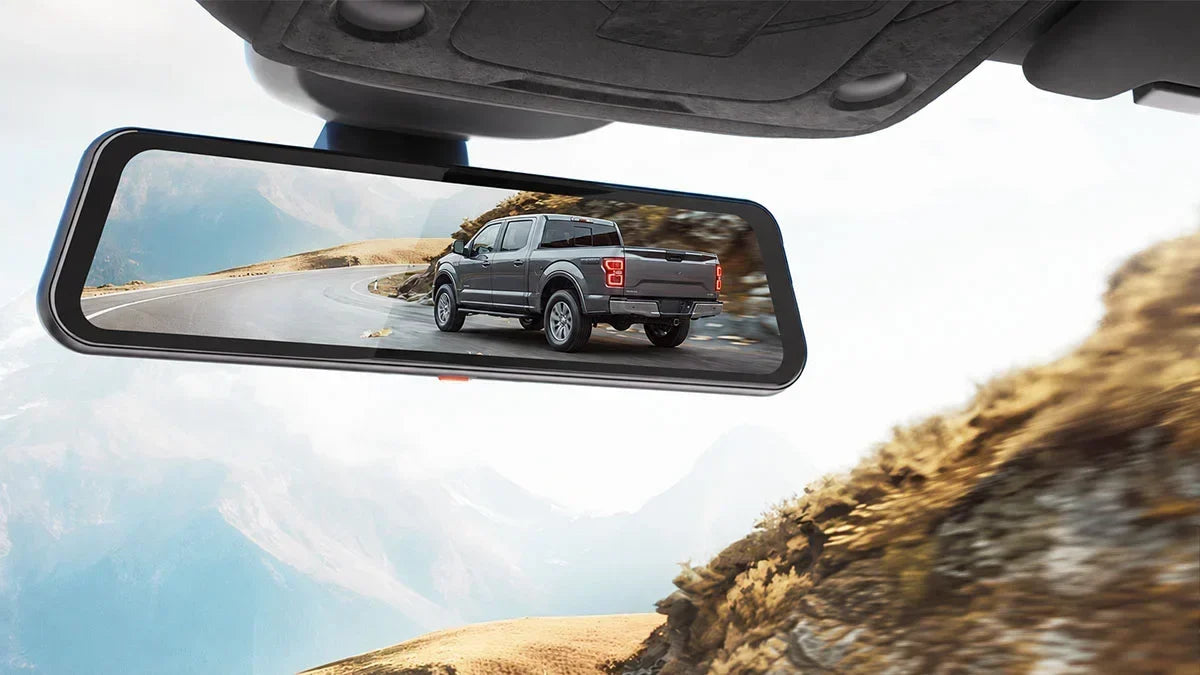
Finding the best dash cam for Ford F150 means looking past generic sedan reviews. You need to consider what makes driving a truck different. The F-150 sits higher, covers more ground with a bigger windshield, and likely handles towing, hauling, or the occasional trail run.
Most modern F-150s have the forward-facing camera that powers Ford's Co-Pilot360 mounted right behind the mirror. A poorly placed dash cam can block that camera, interfering with collision avoidance and lane-keeping. [1]
This guide walks you through the fundamentals of a truck-specific dash cam setup. We'll cover the best possible place(s) to mount the dash cam safely around the Co-Pilot360. Then you'll learn about top Wolfbox models that make the most sense for how you actually use your F-150.
Why the Ford F-150 Needs a Specialized Dash Cam
An F-150 has a few quirks that change how a dash cam should be set up — its height, the large windshield, and aluminum-body grounding all matter. [2] A cam designed for a Civic still works, but mount placement and lens choice need to be checked against the F-150 layout.
Truck-Specific Driving Dynamics
An F-150 doesn't necessarily need a wider-angle dash cam than a sedan to capture a comparable forward-facing view. Its higher driving position gives the dash cam a different vantage point, often allowing it to see over sedans and smaller SUVs and capture more of the road ahead.
Because the camera is mounted higher above the ground, the same field of view can produce a different perspective than it would in a lower sedan. For drivers looking for the best dash cam for Ford F-150, field of view should therefore be considered alongside mounting height, camera angle, and the type of coverage needed.[3]
Physical Installation Challenges
An F-150's large windshield gives you plenty of room to work with. However, you still need to avoid the forward camera housing behind the mirror. Even the aluminum body Ford introduced in the 2015 model year requires extra attention.
The aluminum's grounding needs additional care during a hardwire install. Ford owners and technicians widely advise against grounding accessories directly to the frame. Otherwise, you may face accelerated corrosion between the steel frame and aluminum body. [4]
Usage Patterns
Off-roading, towing, and work-truck duty put extra demands on a dash cam. [5] A commuter sedan rarely sees that kind of job-site rigors.
More vibration, wider temperature swings, and a real need for bumper-level visibility come up when navigating tight trails or backing up to a trailer.
Front and Rear Coverage: Why F-150 Owners Need Both
F-150 owners need both front and rear coverage. A front-only dash cam frequently misses impacts that primarily affect a big truck. These include rear-end hits, parking lot dings, and trailer-related mishaps. A best dash cam for a Ford F-150 front-and-rear setup gives you the full picture.
Rear-End Collisions and Parking Incidents
A front-only camera can't show what happened if someone rear-ends you at a light. An F-150's large size makes it an easy target in crowded parking lots. Rear-end crashes remain one of the most common collision types on US roads. Rear footage provides solid evidence against false accusations. [7]
Towing and Reversing
A rear camera lends a hand whenever you're backing a trailer into a tight spot or navigating a crowded campsite. The device gives you a wider, clearer view to move the large truck. Your rearview mirror alone can't deliver that.
Off-Road Recovery
On the trail, rear footage documents obstacles, recovery attempts, and contact with rocks or ruts. It's an important aspect if you ever need to explain what happened to a recovery point or skid plate.
The Wolfbox G900Pro is a strong fit here, pairing a 4K front camera with a 2.5K rear camera—a Sony STARVIS 2 IMX678 front sensor with an OmniVision OS04J10 rear sensor. They give F-150 owners sharp footage in both directions without a third channel. [8] [9]
3-Channel Dash Cams: The Ultimate F-150 Setup
A 3-channel dash cam grants F-150 owners a third angle beyond front and rear. It can provide a bumper-level view for off-roading and towing, or an interior view for work trucks and families. Which version suits your demands depends entirely on how you use your truck.
Bumper Camera Version (Off-Road/Towing)
Wolfbox G900TriPro bumper version adds a dedicated under-bumper lens. It shows obstacles just ahead of the bumper, which is critical for judging approach angles on the trail. The same goes for spotting curbs or low obstacles the driver's seat simply can't see. [10] [11]
Cabin Camera Version (Commercial/Family)
Wolfbox G900TriPro cabin version swaps the bumper lens for an interior infrared camera. It actively monitors passengers, kids, or pets inside the vehicle. It's a natural fit for rideshare driving, fleet use, or families who want a documented record of what happens inside. [12] [13]
How Do F-150 Owners Benefit from These?
Off-roaders get to see trail obstacles that are otherwise invisible from the driver's seat. Meanwhile, work trucks can monitor cargo and families can keep an eye on back-seat activity.
The Wolfbox G900TriPro Bumper Version and G900TriPro Cabin Version feature the same Sony STARVIS and OmniVision dual-sensor setup. The bumper camera features IP67 waterproof protection, making it suitable for exterior and off-road use. The Cabin camera features 4 IR lights to provide clearer visibility inside the cabin, especially at night.[14]
Night Vision and Low-Light Performance: Critical for F-150 Owners
Night vision matters more for F-150 owners than it does for the average commuter. Many work trucks, tow rigs, and off-roaders are out after dark. They have to deal with trailer lighting, tailgate glare, or unlit trails. A dash cam with a weak low-light sensor turns into a blurry, useless recording.
Sensor and Tech Requirements
Sony's STARVIS sensor line remains the gold standard for automotive night recording. A larger 1/1.8-inch sensor size captures noticeably more light than the smaller sensors found in budget dash cams. [15] Pair that with HDR or WDR processing to prevent headlight glare from blowing out your footage. Also, consider 3D noise reduction to cut grain without smearing away real detail.
F-150-Specific Night Challenges
Newer F-150 trims with LED headlights create sharper, more intense glare than older halogen setups. It makes HDR processing nearly essential. [16] The truck's higher ride height means more hood reflection into the frame at night. A rear camera also has to handle tailgate lighting and trailer running lights without washing out the picture.
Top Dash Cam Features for Your F-150
The right features turn a dash cam from a simple recorder into a highly beneficial truck accessory. A handful of those features are more important for an F-150 than for the average car.
5.8GHz WiFi and App
Fast 5.8GHz WiFi pulls even data-heavy footage to your phone in minutes. It feels like a lifesaver if you need to grab a clip quickly after a trail incident or parking lot bump. [8]
GPS Functionality
Built-in GPS timestamps your route and speed on every clip. It becomes definitive evidence if you ever need to prove exactly where and how fast you were towing or driving off-road. [10]
Voice Control
Hands-free commands like “take picture” or “lock the video” let drivers control key dash cam functions without reaching for the screen or buttons, helping them keep their attention on the road. [9][9]
24/7 Parking Monitoring
Continuous parking monitoring, paired with a proper hardwire kit, protects your F-150 while it sits in a job site lot or driveway overnight. It effectively documents any contact or attempted break-in. [12]
Reverse Assist
A dash cam that doubles as a reverse-assist display gives you an extra set of eyes while backing up a trailer. It feels more like a bonus to your F-150's factory camera. [11]
Camera Coverage
Between the G900 series' 12-inch IPS touchscreen and split-screen display, you can view front, rear, and (on TriPro models) bumper or cabin footage simultaneously. It's a genuine upgrade over toggling between views on a smaller screen. [8] [10] [12]
Summary Comparison: G900Pro vs G900TriPro Bumper vs G900TriPro Cabin
|
Model |
Channels |
Front Sensor |
Front / Rear Resolution |
Third Cam |
Best For |
|---|---|---|---|---|---|
|
G900Pro |
2-channel |
Sony STARVIS 2 IMX678 |
4K + 2.5K |
None |
Daily drivers wanting sharp front/rear coverage |
|
G900TriPro Bumper |
3-channel |
Sony STARVIS 2 IMX678 |
4K + 2.5K |
1080P bumper cam |
Off-roading, towing, tight approach angles |
|
G900TriPro Cabin |
3-channel |
Sony STARVIS 2 IMX678 |
4K + 2.5K |
1080P IR cabin cam |
Work trucks, rideshare, families monitoring cargo or kids |
Understanding F-150 Co-Pilot360: Where NOT to Mount Your Dash Cam
Ford's Co-Pilot360 suite relies on a forward-facing camera mounted behind your windshield near the rearview mirror housing. Mounting a dash cam over it or too close can interfere with features like lane-keeping and automatic emergency braking. [1]
Co-Pilot360 Camera Location
The Co-Pilot360 forward cam sits behind the rearview mirror housing, tucked near the top of the windshield. Don't block, shade, or crowd the housing with your dash cam mount. Doing so can turn off features like Pre-Collision Assist, lane-keeping, and automatic emergency braking.
Safe Mounting Zones
The lower center of the windshield, just below the Co-Pilot360 housing, gives your dash cam a clear forward view. It keeps recording without competing for space with Ford's own camera. The position also keeps the unit within your wiper's cleaning path, letting you keep the lens clear during rain or snow.
Post-Installation Check
You've mounted your dash cam. Now, start the truck and confirm your ADAS features are active. Check the instrument cluster for lane-keep and collision-warning indicators. [6] Wolfbox mirror-style mounts typically sit forward of the factory camera housing, so a properly installed unit shouldn't interfere with the Co-Pilot360.
Step-by-Step Hardwire Installation Guide for Ford F-150
Hardwiring a dash cam in an F-150 follows the same general process as any truck. However, the fuse panel location and the aluminum body's grounding quirks are worth knowing before you start.
Fuse Panel Locations by Model Year
Most F-150s route the interior fuse panel to the left of the steering column. It gets tucked behind a small access panel, while the engine-bay fuse box sits near the battery under the hood. [18]
Exact fuse numbers and panel layouts shift between generations. Always check your specific model year in the manual or on the fuse panel diagram printed inside the access cover.
Recommended Fuse Taps
Look for an ACC (ignition-switched) fuse and a constant-power (BATT) fuse in the interior panel. This pairing lets the kit detect whether the truck is running or parked. A simple test light or multimeter confirms which fuse slots behave which way before you commit to a connection. [18]
Ground your hardwire kit to a factory grounding point, not directly to the frame. Grounding straight to the frame can trigger corrosion between the steel frame and the aluminum body panels. [4] Route your cable along the A-pillar and headliner trim, then tuck it behind the factory panels.
A hardwire kit with reliable low-voltage protection matters just as much as correct wiring. Wolfbox's hardwire kits cut power automatically once voltage drops to a safe threshold. Thus, it protects your F-150's battery from the kind of deep discharge that shortens its lifespan. [17]
Conclusion
Finding the best dash cam for Ford F150 driving comes down to matching your setup to how you use the truck. The G900Pro covers daily front-and-rear needs cleanly, whereas the TriPro Bumper Version adds trail-ready visibility for off-roaders. [8] [10] Meanwhile, the TriPro Cabin Version keeps an eye on cargo and passengers for work trucks and families. [12]
Position the chosen dash cam below the Co-Pilot360 housing to keep that camera unobstructed. [1] And make sure to ground the power wire to clean metal on the chassis — the aluminum body corrodes quickly when dissimilar metals are in contact. [4] Follow the installation instructions properly, and you'll have a setup that protects your truck without interfering with the safety systems. Pick the G900Pro for daily front-and-rear coverage, the TriPro Bumper for trail and towing, or the TriPro Cabin for family and fleet use.


Frequently Asked Questions (FAQs)
Will a dash cam interfere with my F-150's Co-Pilot360 system?
Not if it's mounted correctly. Keep your dash cam below or to the side of the Co-Pilot360 camera housing behind the rearview mirror. Avoid blocking or shading the housing, so features like lane-keeping and automatic emergency braking keep working.
Where do I hardwire a dash cam in an F-150?
Most F-150 hardwire kits tap into the interior fuse panel near the steering column. Pull from the ACC fuse and the constant-power fuse, then route the cable along the A-pillar and headliner to the dash cam. Always confirm your specific fuse layout against your owner's manual first.
Is a 3-channel dash cam worth it for an F-150?
For off-roaders and work-truck owners, yes. The extra bumper or cabin angle documents obstacles, cargo, or passengers that a standard front-and-rear setup can't see. This coverage is especially crucial on a truck compared to a typical commuter car.
Will the F-150's aluminum body affect dash cam installation?
It mainly affects where you ground a hardwire kit. Ground to a proper factory grounding point rather than the frame itself. Strictly speaking, grounding directly to the frame can cause corrosion between the steel frame and aluminum body panels over time.
References
[1] Ford Motor Company: “Ford Co-Pilot360 Driver Assist Technology” – https://ford.com/technology/driver-assist-technology
[2] F150 Forum: “F-150 Dash Cam” – https://www.f150forum.com/f129/dash-cam-581622/
[3] Wolfbox: "Dash Cam Angle Optimization Guide" – https://wolfbox.com/blogs/dash-cams/dash-cam-angle-optimization-guide
[4] F150 Forum: "Electrical Ground" – https://f150forum.com/f118/electrical-ground-518433
[5] Radius: "10 Reasons a Dash Cam Should Be on Every Commercial Vehicle" – https://www.radius.com/en-nz/blog/10-reasons-a-dash-cam-should-be-on-every-commercial-vehicle/
[6] Wolfbox: "ADAS Dash Cam to Transform Your Drive into a Safer Journey" - https://wolfbox.com/blogs/dash-cams/adas-dash-cam
[7] National Highway Traffic Safety Administration (NHTSA): "Research Note: Overview of Motor Vehicle Traffic Crashes" – https://crashstats.nhtsa.dot.gov/Api/Public/Publication/813705
[8] Wolfbox: “Wolfbox G900Pro Dash Cam” – https://wolfbox.com/products/wolfbox-2024-g900-pro-wifi-touch-screen-parking-monitoring-dash-cam-smart-mirror-with-starvis-678-sensor
[9] Tech Radar: “Wolfbox G900Pro Dash Cam Review” – https://www.techradar.com/vehicle-tech/dash-cams/wolfbox-g900-pro-dash-cam-review
[10] Wolfbox: “Wolfbox G900TriPro Bumper Version” – https://wolfbox.com/products/wolfbox-g900tripro-bumper-version-3-channel-rearview-mirror
[11] Hunting Life: “Wolfbox G900TriPro Bumper Edition Review” – https://huntinglife.com/wolfbox-g900-tripro-review/
[12] Wolfbox: “Wolfbox G900TriPro Cabin Version” - https://wolfbox.com/products/wolfbox-g900tripro-cabin-version-3-channel-dash-camera
[13] Bronco6G: “wolfbox G900TriPro Cabin Camera Installation and Review” – https://www.bronco6g.com/wolfbox-g900-tripro-w-cabin-camera-installation-review/
[14] Dash Cam Guys: "Wolfbox G900 TriPRo Review: Cabin vs Bumper Tested at Home" – https://dashcamguys.com.au/blogs/reviews/wolfbox-g900-tripro-review-cabin-vs-bumper-tested-at-home
[15] Wolfbox: "The STARVIS 2 Question" – https://wolfbox.com/blogs/dash-cams/the-starvis-2-question-what-a-new-sensor-actually-changes-in-a-dash-cam-s-night-footage
[16] Wolfbox: "What is WDR on Dash Cam" – https://wolfbox.com/blogs/news/what-is-wdr-on-dash-cam
[17] Wolfbox: "Wolfbox Dash Cam Multifunctional Kit" – https://wolfbox.com/products/wolfbox-dashcam-multifunctional-hardwire-kit
[18] Ford Motor Company: "2024 F-150 Owner's Manual — Fuse Box Locations and Power Distribution" – https://www.ford.com/support/vehicle/f150/2024/owners-manual/

Leave a comment
All comments are moderated before being published.
This site is protected by hCaptcha and the hCaptcha Privacy Policy and Terms of Service apply.