













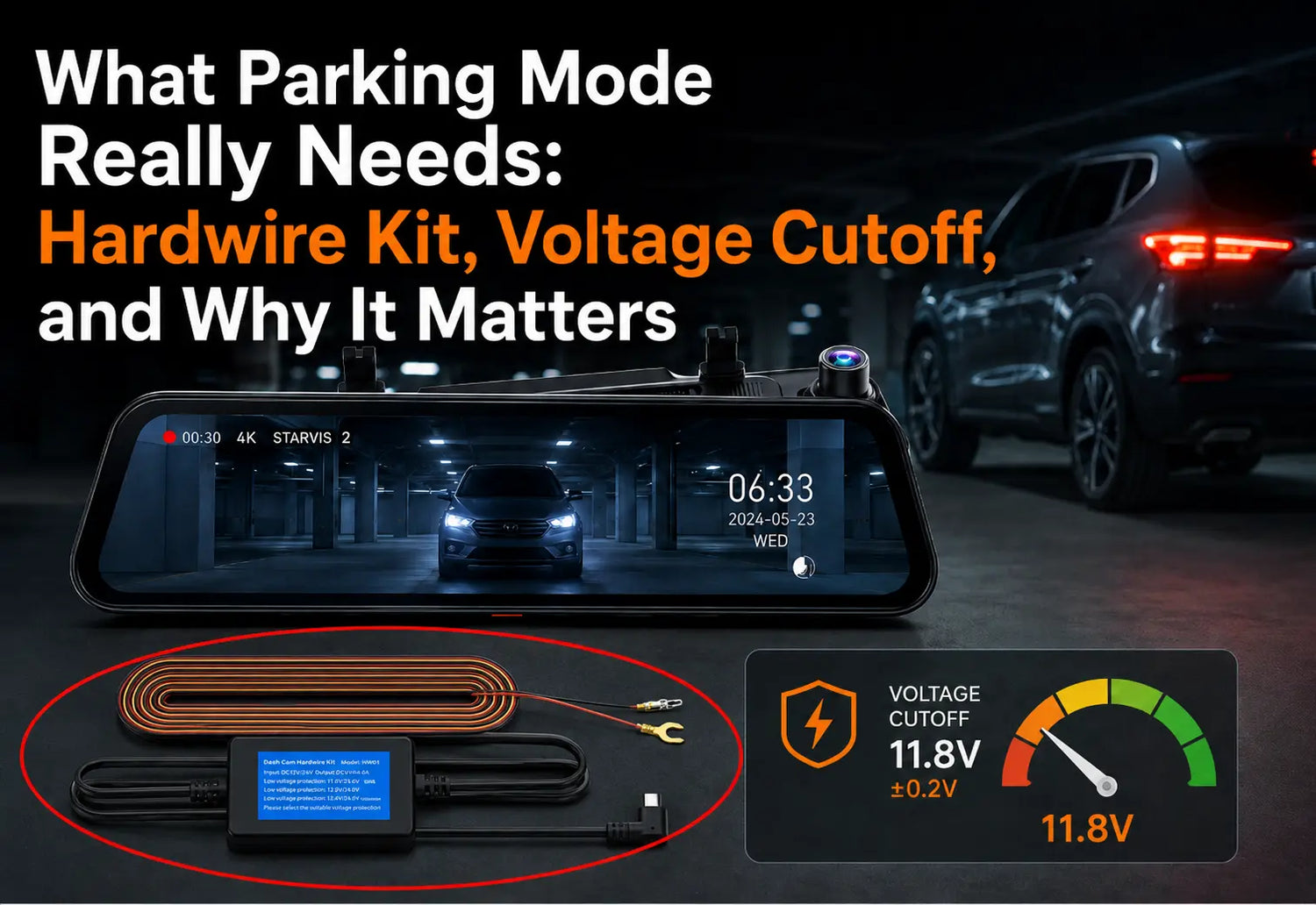
The question that appears most often in Wolfbox support threads and owner troubleshooting discussions is straightforward: why isn't parking mode working? The G900 Pro and G900TriPro both support parking mode — but only when the Wolfbox Hardwire Kit is installed, and only when it's wired correctly. A camera connected to a standard 12V socket or OBD-II port will not record after the ignition cuts off, regardless of what settings you enable.
Why the Hardwire Kit Is Not Optional
Most 12V accessory sockets and OBD-II ports in modern vehicles are switched — they lose power when the ignition turns off. The G900 Pro draws from these sources during normal driving, so it shuts off with the engine. There is no settings-level workaround for this. Parking mode requires constant power from a circuit that stays live after ignition off.¹
The Wolfbox Hardwire Kit for the G900 Pro uses a USB-C (Type-C) connection. It taps into the fuse box using two circuits: a B+ constant-power fuse (live at all times) and an ACC ignition-switched fuse (cuts off when the car turns off). The camera uses the ACC signal to detect whether to record normally or switch to parking mode.⁴

The Three Parking Behaviors
|
Mode |
How It Works |
Storage Use |
Best Fit |
|
Motion-triggered |
Camera wakes on detected motion, records a clip, returns to standby |
Event files only — storage-efficient |
Street parking, insurance documentation, hit-and-run evidence |
|
Time-lapse |
Continuous recording at ~1 frame per second while parked |
Higher — continuous files across the parked period |
Overnight fleet lots, locations with frequent activity |
|
No Hardwire Kit installed |
Camera off — no recording after ignition |
None |
Garage parking, short indoor stops |
For most personal and rideshare vehicles, motion-triggered mode is more practical. It creates discrete event files with timestamps, consumes less storage, and immediately flags relevant incidents. Time-lapse is useful when you need a continuous visual record of everything that happened around a parked vehicle overnight.⁵
The Voltage Cutoff: 11.8V and What It Means
The Wolfbox Hardwire Kit cuts power automatically when the vehicle battery drops to 11.8V (±0.2V). This happens within 60 seconds of reaching that threshold.⁴ The number is not arbitrary — it represents the point below which a standard 12V lead-acid battery has lost enough charge that cold-weather engine starting becomes unreliable. The cutoff protects the battery, not the camera.
|
Battery Resting Voltage |
Approximate State of Charge |
Parking Mode Status |
|
12.6–12.7V |
~100% |
Fully charged — parking mode can run freely |
|
12.4V |
~75% |
Healthy — no concern |
|
12.2V |
~50% |
Moderate — normal operation |
|
12.0V |
~25% |
Low — typical sessions will still complete before cutoff |
|
11.8V ±0.2V |
Auto-cutoff point |
Hardwire Kit shuts camera off within 60 seconds |
If your battery is old or has reduced health, it reaches the 11.8V cutoff faster — not because the setting is wrong, but because the total available charge is lower. If overnight parking mode is draining your battery, have the battery load-tested before adjusting any dash cam settings.²
Installation: The Two Fuses You Need and How to Find Them
The Hardwire Kit's built-in display tells you when you've found the right fuse. When B+ is connected correctly, the display lights up, flashes the low-voltage setting three times, and then shows current battery voltage. When ACC is correctly connected, the display shows 'ACC.'⁴
- Locate the fuse box — typically under the dashboard or in the engine bay (check your vehicle owner manual).
- Find a B+ fuse: stays live when ignition is off. Common examples: interior lights, central locking. Use the kit display to confirm.
- Find an ACC fuse: loses power when ignition is off. Common example: cigarette lighter. Display shows "ACC" when correctly connected.
- Both fuses should be in the 10A–25A range. Do not connect to ABS, airbags, or other safety-critical circuits.⁴
- Ground the black wire to a chassis ground bolt — bare metal contact, not plastic.
- Route the 3.5m cable along the headliner and A-pillar to the mirror mount.
- Connect the USB-C cable to the G900 Pro. Push firmly until you hear a click — the connector locks.
- Enable parking mode in camera settings. If recordings don't appear after parking, check Wolfbox firmware guidance before troubleshooting further.⁶⁹

Common Problems and Confirmed Fixes
|
Symptom |
Likely Cause |
Fix |
|
Camera off immediately at ignition cut |
Hardwire Kit not installed; camera on 12V socket power only |
Install Hardwire Kit on B+ constant-power fuse |
|
Parking mode enabled but no clips recorded |
Firmware not updated; or ACC wire on a constant-power fuse |
Update firmware via Wolfbox app; verify ACC wire is on an ignition-switched fuse |
|
Battery depleted after overnight parking |
Old battery reaches 11.8V cutoff faster than expected |
Load-test the battery; parking mode cannot fix a failing battery |
|
Constant false triggers |
Motion sensitivity set too high for a high-traffic environment |
Lower sensitivity setting in parking mode menu |
|
Hardwire Kit fuse blows |
Fuse outside 10A–25A range or circuit at capacity |
Choose a different fuse in the correct amperage range |
|
Camera records normally even when parked |
B+ and ACC wires swapped during installation |
Swap the two wire connections — display shows "ACC" label when ACC is correctly identified |
SD Card Requirements for Parking Mode
Standard consumer microSD cards are not designed for the write patterns that parking mode creates — frequent small writes over extended periods, in variable ambient temperatures. For parking mode use, a high-endurance card rated for continuous write cycles is the correct choice. Class 10 / U3 is the minimum spec for 4K recording.
Frequently Asked Questions
Q: Does the G900 Pro support parking mode without the Hardwire Kit?
A: No. The camera has no power source after ignition off without the Hardwire Kit. The direct fuse-box connection is what keeps it running while parked.
Q: What is the voltage cutoff for the Wolfbox Hardwire Kit?
A: 11.8V (±0.2V), automatic, within 60 seconds of reaching that threshold. This is set by the kit hardware, not a camera setting.
Q: Can parking mode drain my car battery?
A: If the battery is healthy, no — the 11.8V cutoff prevents it. If the battery is old or degraded, it may reach the cutoff faster than expected. Load-test the battery if you're experiencing discharge issues.
Q: My parking mode is on but not recording. What's the most common fix?
A: Check Wolfbox firmware guidance first; Wolfbox lists firmware upgrade as a troubleshooting step when parking-monitoring behavior does not appear or work correctly. Also verify that the ACC wire is on an ignition-switched fuse, not a constant-power fuse.
Q: Which fuses should I use for installation?
A: 10A–25A rated fuses that are not connected to safety-critical systems. B+ fuse: interior lights or central locking. ACC fuse: cigarette lighter. The kit's display confirms correct identification of each circuit.
Q: Does the Hardwire Kit work with both G900 Pro and G900TriPro?
A: The G900 Pro Hardwire Kit uses a USB-C (Type-C) connector. Confirm the correct kit for your model on the Wolfbox accessories page — connector types differ between camera generations.
Q: What SD card should I use for parking mode?
A: Class 10 / U3 minimum for 4K. For extended parking mode, use a high-endurance card (Samsung PRO Endurance or SanDisk High Endurance) rated for continuous write cycles.
References
[1] Wolfbox G900 Pro product page — parking monitoring requires Hardwire Kit: https://wolfbox.com/products/wolfbox-2024-g900-pro-wifi-touch-screen-parking-monitoring-dash-cam-smart-mirror-with-starvis-678-sensor
[2] Battery University — lead-acid state of charge vs resting voltage: https://batteryuniversity.com/article/bu-903-how-to-measure-state-of-charge
[3] Wolfbox — dash cam parking mode and security guide: https://wolfbox.com/blogs/dash-cams/dash-cam-parking-mode-amp-security-guide
[4] Wolfbox Hardwire Kit for G900 Pro: https://wolfbox.com/products/wolfbox-dash-cam-hardwire-kit-for-g900pro
[5] Wolfbox — how to prevent dash cam from draining your battery: https://wolfbox.com/blogs/dash-cams/how-to-prevent-dash-cam-from-draining-your-battery
[6] Wolfbox G900TriPro Bumper product page: https://wolfbox.com/products/wolfbox-g900tripro-bumper-version-3-channel-rearview-mirror
[7] Samsung PRO Endurance microSD — write endurance for dashcam continuous use: https://news.samsung.com/global/samsung-unveils-new-pro-endurance-memory-card-optimized-for-surveillance-and-dashboard-cameras
[8] Wolfbox firmware page: Firmware

Leave a comment
All comments are moderated before being published.
This site is protected by hCaptcha and the hCaptcha Privacy Policy and Terms of Service apply.